

Play of the Hand
Using the dummy
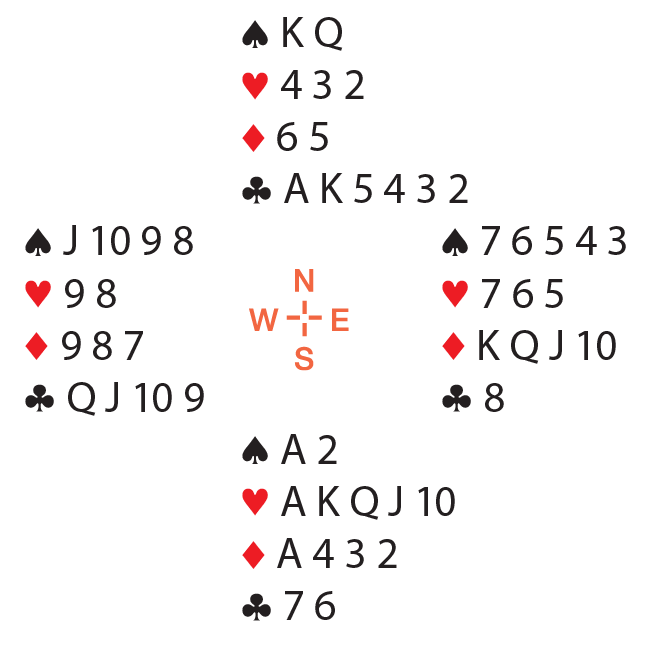
This deal from Bridge Master, a free, interactive declarer-play program on Bridge Base Online, illustrates the importance of a long suit and managing entries.

On the lead of the ♥9, South must consider what to do with the diamond losers in hand. After at trump lead, the timing isn’t there to ruff diamonds in the dummy – the defenders will keep leading trump.
If North’s club suit can be set up, the contract can be made easily. With careful play, South can even handle a 4–1 break in the club suit.
After drawing trump, South should duck a club, i.e., play a low club from both hands. Suppose a spade comes back; South should win in hand with the ♠A and play another club to the ace. If a defender shows out on the ♣K, declarer can ruff a club and reenter dummy with the ♠K to run the clubs, pitching the three losing diamonds.
The full deal:
Best Bidding
Advancing an overcall
Advancing an overcall
Last month we talked about overcalls. What do you (the “advancer”) do after partner makes a simple overcall? (“Simple” means not a preemptive jump overcall.) Here’s some good advice from expert Larry Cohen:
Advancer has support
A raise by advancer is normal – much like raising an opening bid – about 6–10 HCP.

You could raise with something like:
♠A J 4 ♥K 5 3 ♦9 8 5 4 3 ♣7 3.
With a stronger raise, the advancer should cuebid the opponent’s suit (i.e., bid the opponent’s suit):
♠A J 10 4 ♥K 5 3 ♦A 8 5 4 3 ♣3.

It doesn’t matter the level of the overcall. No matter what the overcall, if the advancer bids the opponent’s suit, he is promising a limit raise or better (10 HCP in support and three or more trumps). Not everyone plays the cuebid this way (as guaranteeing support), but I highly recommend it. This method makes things simple. The overcaller can jump to game without worrying that advancer might not have support. Note: In all the examples above, the responder is shown as passing. Even if the responder acts (a bid or a negative double), the meanings of the calls for the advancer are still the same.
Because a raise shows 6–10 HCP and a cuebid shows a limit raise, a jump raise should be weak, 0–6 HCP and four trumps.
Advancer does not have support
What if the advancer does not have support? With a notrump hand (stopper in the opponent’s suit), he can bid 1NT, 2NT or 3NT – depending on how many points he has. A 1NT advance is approximately 8–11 HCP, 2NT is approximately 12–14. 3NT is more. The exact range depends on overcall style and vulnerability.
What if the advancer bids a new suit? Typically, this shows a five-card or longer suit. The big issue: Is a new suit forcing? It is best to adopt a simple rule for new suits. Here are two possible ways to play it – choose one:
1) New suits by advancer are never forcing. In this case, I suggest that a jump by advancer is natural and forcing (he needs some way to show a good hand).
OR
2) New suits by advancer are forcing (unless advancer is already a passed hand).
The ACBL website offers a treasure trove of resources. Some are kept in a members-only section of the website called MyACBL. It’s via this portal where you can find the online Bridge Bulletin, with all issues going back to 2005 available. There is also a lot of personalized data.
To view any of these items, you must be logged in. Start by going to acbl.org and look for the MyACBL Login button at the top of the page. Click to log in. You will be taken to the login screen.
If you have already set up your MyACBL account, simply type in your member number and password in the appropriate fields and click the blue “Log In” button. If you do not yet have a MyACBL account, you can set it up by clicking “Register for MyACBL.”
You can also reset a forgotten password from this screen by clicking “Forgot Password.”
